Step 1: Scan Wi-Fi Link
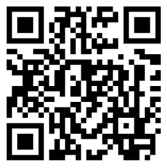
Connect to translation Wi‑Fi: Press the QR code, or scan it from another device, then tap the link to join the ‘Translation’ Wi‑Fi network.
Step 2: Join a Room
Click your preferred language button below.
Step 3: Listen
When the page opens, tap ‘Join in app’ or ‘Join in browser’ and plug in your headphones.
Note: Translation will be available 15 minutes before the meeting starts.
Schedule
| Date | Time (DST) | Meeting |
|---|---|---|
| 5/8/2026 | 7:30 PM | Meeting 1 Bellevue |
| 5/9/2026 | 10:00 AM | Meeting 2 Bellevue |
| 5/9/2026 | 1:30 PM | Meeting 3 Bellevue |
| 5/10/2026 | 9:30 AM | Lord’s table Meeting 4 Seattle |